Introducing Sketch Text: Turn Words into Geometry
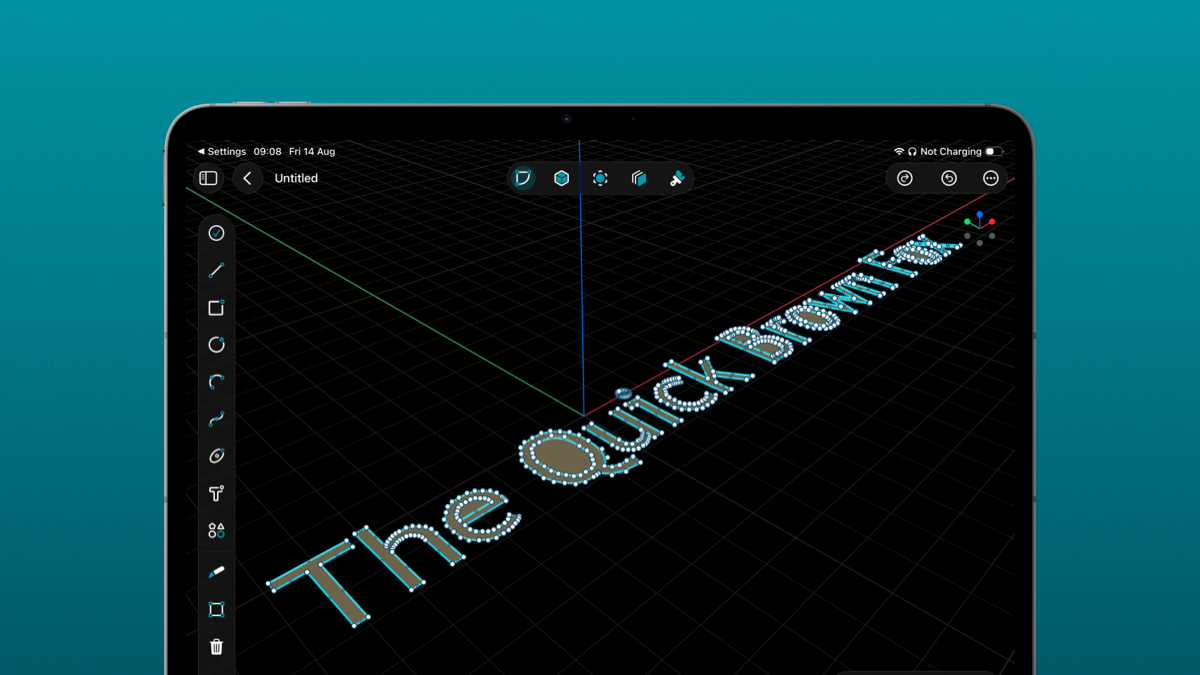
Sketch Text just landed in PixyCAD. Type a word, choose a font, set the height, and it drops into your sketch as real geometry. Labels, name plates, embossed logos, engraved part numbers: the text you used to fake with imported outlines is now a single tool. And like a lot of what we ship, it exists because you asked for it.
Why we built it
Getting text onto a part has always been a chore. You would design your name plate somewhere else, export an outline, import it, scale it, and hope the curves survived the trip. If you wanted to change a single letter, you started over. Meanwhile the thing you actually wanted was simple: type the word, put it where it goes, done. So we built exactly that.
What Sketch Text actually does
The idea is simple. You open Sketch Text and give it a few things:
- The text. Whatever you want on the part: a name, a number, a label, a short line of copy.
- A font. Pick the typeface, then bold, italic, or underline if you need it.
- A height. Set how tall the letters are in millimeters, so the text is sized to the part from the start.
- An anchor. Choose which corner or edge the text grows from, so it lands where you expect on the sketch.
PixyCAD turns your words into proper closed profiles right there in the sketch, letter shapes and counters and all. From that point it is just geometry like any other. Extrude it to raise letters off a surface, or cut it in to engrave them.
Where it earns its keep
A few things Sketch Text makes genuinely easy that used to be a fight:
- Name plates and labels. Type the name, extrude it, and you have a raised name plate in seconds. No outlines, no importing.
- Engraved part numbers. Drop the text on a face, cut it in, and the number is engraved cleanly into the part.
- Embossed logos and branding. Set a bold typeface at the height you want and emboss it straight onto the surface.
- Buttons, dials, and panels. Label controls right where they belong, sized and placed the moment you type them.
Because the text lives in the sketch as editable geometry, it behaves like the rest of your model. Position it, size it, and build on it exactly like any other profile.
Keep the requests coming
Sketch Text is here because enough of you took a minute to say “I just want to put a word on my part.” That is exactly how PixyCAD gets better. If there is a tool or a tweak you are missing, tell us on feedback.pixycad.com, vote for the ideas you care about, and watch them ship.
We are already reading the next batch. Keep it coming.