Say Hello to Swept: Turn a Profile and a Path into Solid Geometry
Swept just landed in PixyCAD. Pick a profile, pick a path, and the profile follows the path to become solid geometry. Tubes, handles, frames, cable channels, trim, railings: the shapes that were awkward or impossible before are now a two step operation. And like a lot of what we ship, it exists because you asked for it.
Why we built it
Swept was one of the most requested tools. People kept running into the same wall: extrude is great for pushing a flat shape straight out, but the real world is full of things that bend. A grab handle curves. A roll cage follows a path. A water channel snakes across a part. Trying to fake those with a stack of extrudes and unions was slow and fragile, and the result never looked right.
You told us this, over and over, in plain language. So we built the tool that solves it.
What Swept actually does
The idea is simple. You give Swept two things:
- A profile. The cross section you want, drawn as a sketch. A circle for a tube. A rounded rectangle for a handle. Whatever shape the part needs when you slice through it.
- A path. The line the profile travels along, drawn as a sketch or built from existing edges. Straight, curved, or a mix of both.
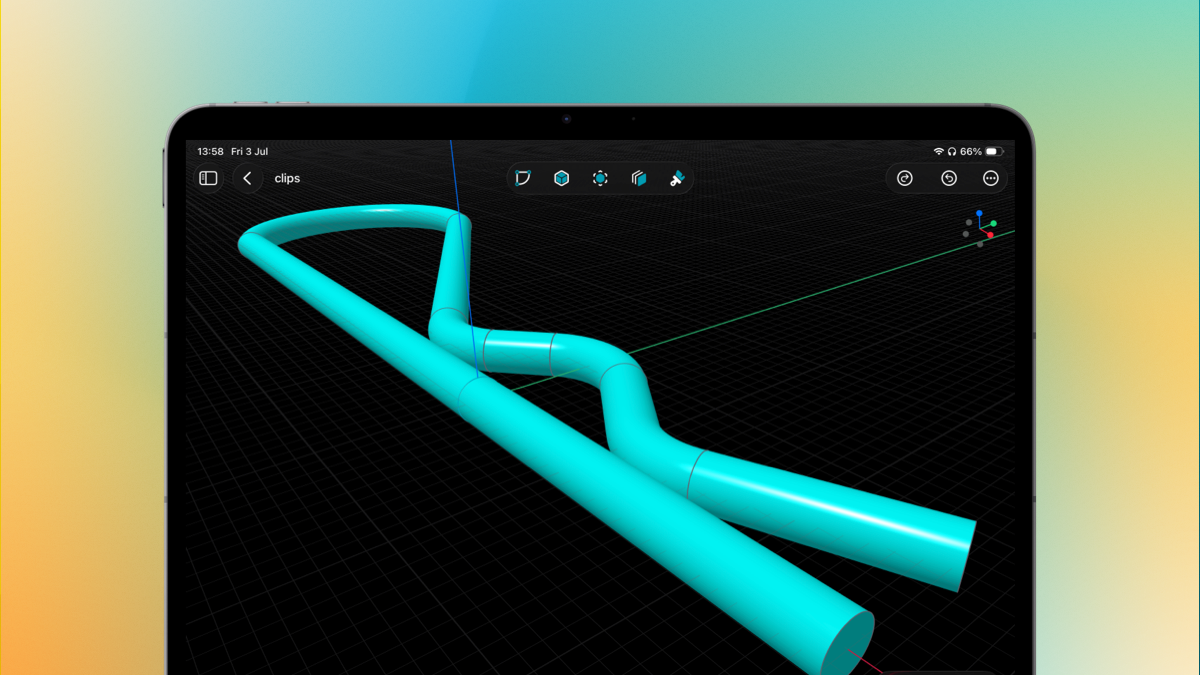
Swept takes the profile and drags it along the path, keeping it square to the direction of travel the whole way. The result is one clean solid that follows your curve exactly. The tube in the image above is a single Swept operation: one circular profile, one bent path, done.
Where it earns its keep
A few things Swept makes genuinely easy that used to be a fight:
- Tubing and pipes. Circular profile, curved path, and you have a bent pipe with a consistent wall the whole way through. Perfect for frames, roll bars, and plumbing style parts.
- Handles and grips. Sweep a rounded profile along an arc and you get a comfortable, printable handle in seconds.
- Trim, rails, and moldings. Draw the cross section once, run it along the edge of your part, and it wraps the corners cleanly.
- Cable and fluid channels. Sweep a shape along a path, then subtract it, and you have a routed channel that follows exactly where you need it to go.
Because the profile stays perpendicular to the path, the cross section stays true from start to finish. No pinching on tight curves, no guesswork.
Keep the requests coming
Swept is here because enough of you took a minute to say “I need to run a shape along a curve.” That is exactly how PixyCAD gets better. If there is a tool or a tweak you are missing, tell us on feedback.pixycad.com, vote for the ideas you care about, and watch them ship.
We are already reading the next batch. Keep it coming.